

 Get in touch
Payment reminders in SAP Business One: The complete guide for SMEs
The most important points in brief
- SAP Business One offers a fully integrated dunning system with up to ten configurable dunning levels.
- Each customer receives a suitable dunning notice with deadlines, fees and interest.
- The dunning assistant guides you from parameter selection to the finished dunning letter.
- Outstanding invoices, installments, credit notes and other customer items are included in the dunning process.
- Interest and late payment fees can be configured for each level and optionally booked automatically.
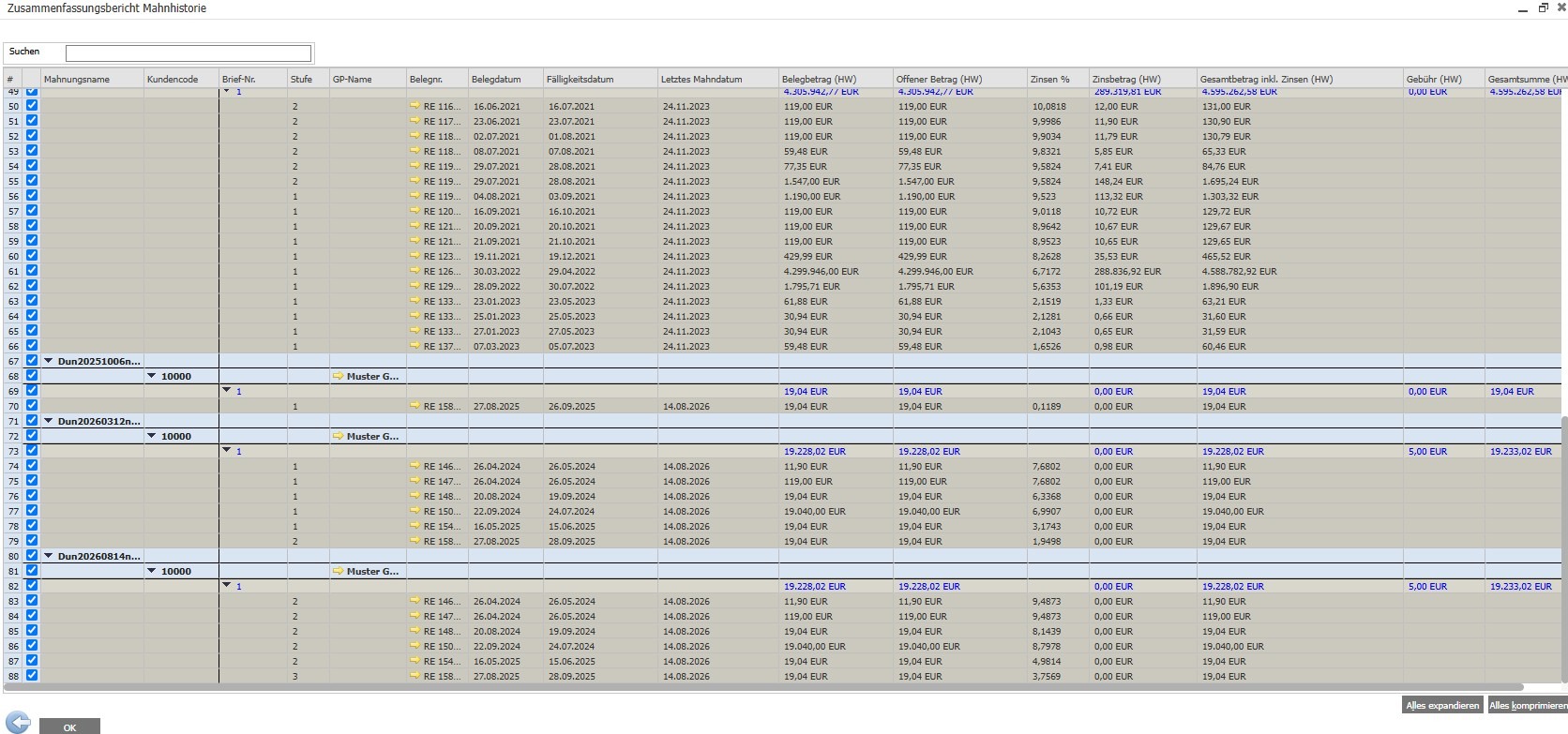
- The dunning history report documents dunning notices, stages, and affected invoices.
- Dunning, financial accounting, and credit management are all interconnected.
- The dunning process actually only applies to customers – but can be extended with an app for supplier dunning.
Outstanding receivables don't always arise from a lack of willingness to pay. Often, invoices or payment deadlines are missed. Simply overlooked in day-to-day business. SAP Business One therefore supports a structured, rule-based dunning process.
This complete guide explains how Reminders in SAP Business One It is set up, implemented, and evaluated. The focus is on dunning levels, customer-specific conditions, the dunning assistant, fees, exceptions, and the link to credit management.
Dunning process in SAP Business One – basics and functionality
Dunning is the structured process of reminding customers of outstanding payments. In SAP Business One, it is... directly integrated into financial accounting and accesses, among other things, open outgoing invoices including installments, sales credit notes, non-invoice-based incoming payments and customer-related manual journal entries.
Overdue items are assigned to a dunning level based on the configured settings. SAP Business One can generate dunning letters including interest and fees. The dunning history report keeps track of the transactions for the internal control and further processing firmly.
Payment reminder terms apply only to customers - supplier reminders require an additional app.
In SAP Business One, payment terms can only be assigned to customers. suppliers You will not receive any reminders via this module. ButThere are apps, such as the reminder app from conesprit, which also... Reminder from suppliers can be done.
rule-based
Reminder letters are generated based on overdue outstanding payments and established rules.
Customer-specific
Each customer can have their own dunning policy with appropriate deadlines and booking rules.
Up to 10 levels
Each stage, from a friendly reminder to a final warning, can be defined separately.
Understandable
The dunning history shows dunning notices, stages and associated invoices per customer.
Reminder levels: The escalation levels in detail
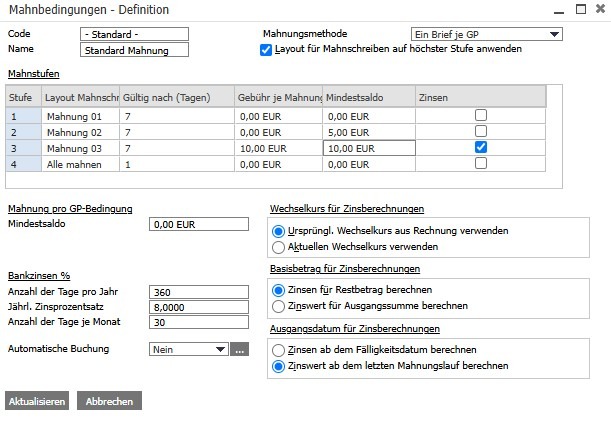
Determine reminder levels, when a reminder is triggered, SAP Business One specifies which layout is used and what interest rates or fees apply. It supports up to ten tiers, but in practice, three to four are often sufficient.
Menu path: Administration → Definitions → Business Partners → Dunning Conditions
The classification is based on the number of days overdue and the threshold values. If the minimum balance or minimum percentage is not reached, the item may be assigned to a lower category. The determined category can be viewed in the proposal. Manually check and adjust to a limited extent.
Practical tip regarding the minimum balance
A minimum balance prevents disproportionate reminders for very small amounts. For the first stage, this is often recommended. a friendly reminder free of charge.
Payment terms: Individual rules per customer
Reminder levels define the general escalation rules. Reminder conditions, on the other hand, specify..., how the process actually works for a customer. They are created under Administration → Definitions → Business Partners → Dunning Conditions and assigned in the customer master data under Payment Terms.
The dunning conditions include the levels used, the dunning method, and the accounting logic for interest and fees. The "Use final dunning text" option ensures that, for items at different levels, the following applies: the layout of the highest included level is used.
Standard terms and conditions for new customers
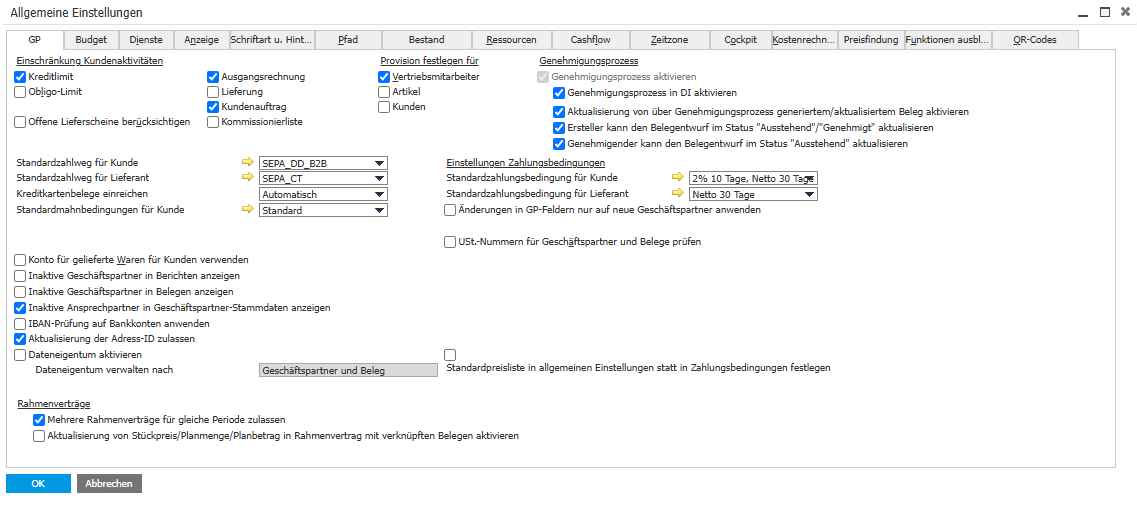
Under Administration → System Initialization → General Settings → GP, a Standard dunning conditions for new customers This information must be stored. Otherwise, new master records without dunning conditions may be created and will be missing from dunning runs.
The dunning assistant: Guided through every run
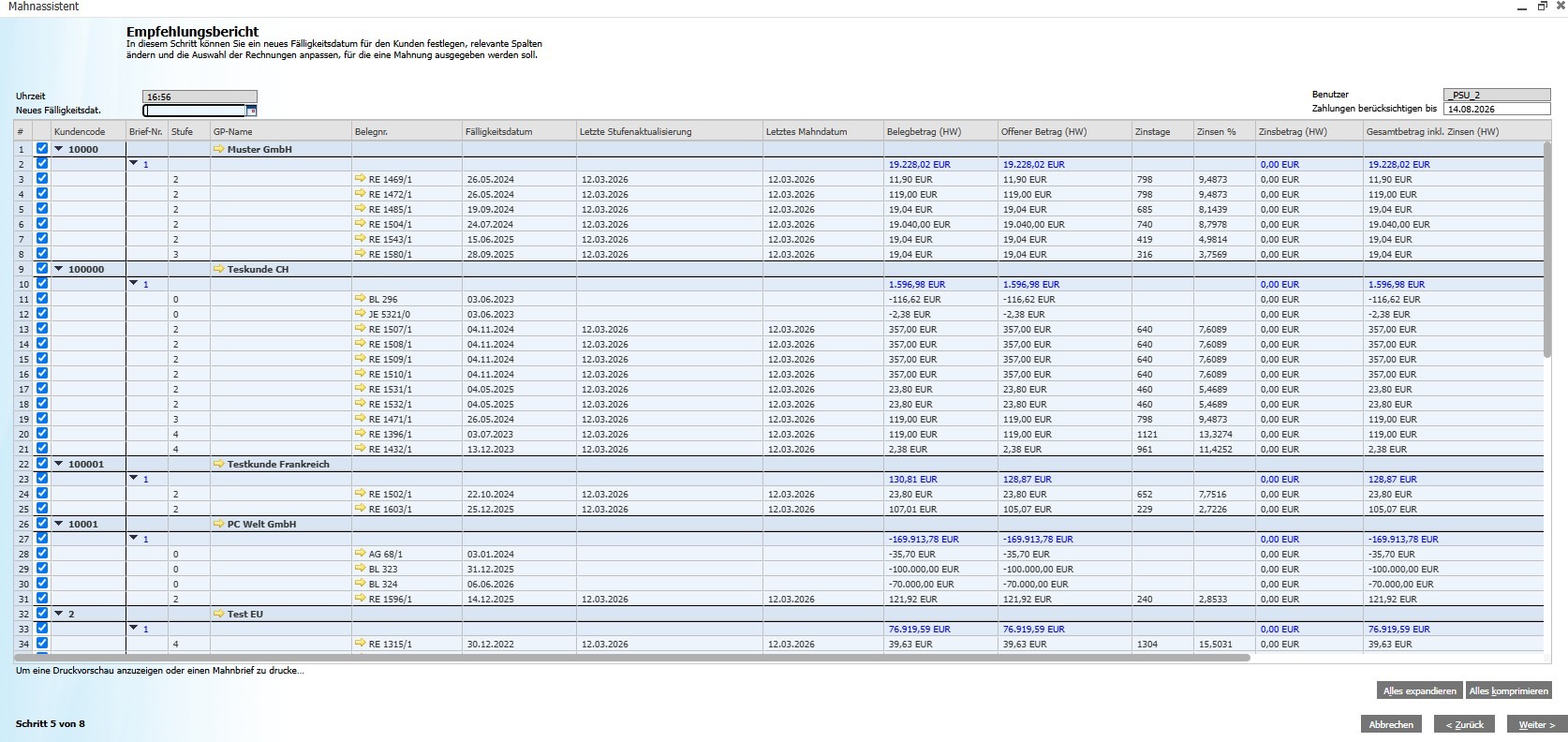
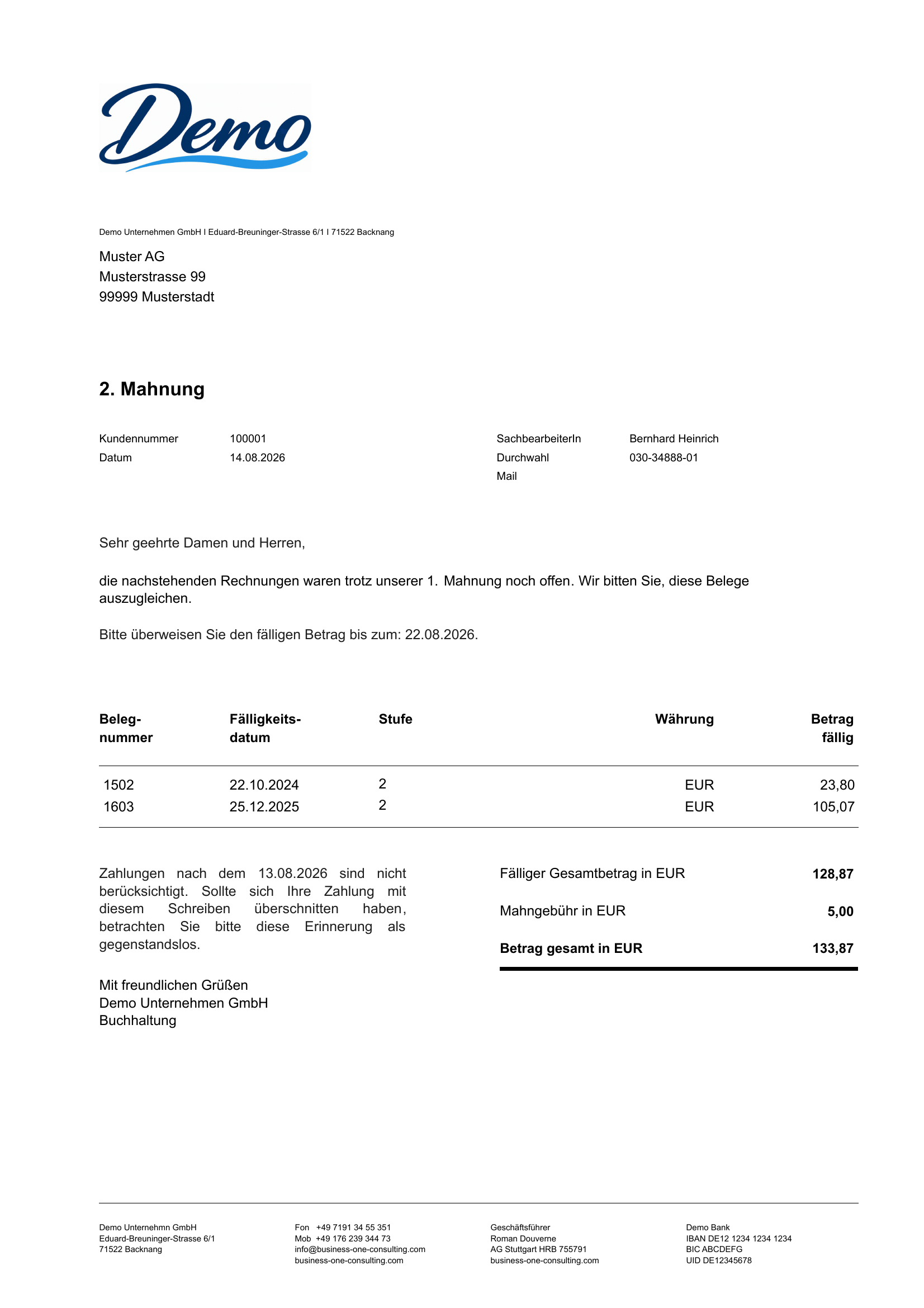
The dunning assistant is the operational core. It guides the user from selection to completion and documents payment behavior. It is started via Sales → Dunning Assistant.
Conduct the dunning run
The dunning process generates dunning letters for the affected customers based on the settings. Important filters are: Business partner, document or due date, maximum dunning level, minimum balance and posting date range.
Upon successful completion, the dunning date and level are saved, and the history is updated. In the regular process, the amount due for each item increases incrementally. Before finalization, the recommended list should be reviewed with accounting and, if applicable, sales.
Experience SAP Business One dunning live
Test dunning and financial accounting in a free demo system.
Start free demoReport on the history of reminders: Evaluation and documentation
The dunning history report shows the dunning notices issued, dunning levels, dunning dates, and affected invoices. It can be searched by... Business partner, dunning date, dunning level and invoice number filter.
Additionally, the aging report shows how long receivables have been outstanding. This allows you to identify priorities in your accounts receivable portfolio. Regular reconciliations with incoming payments help to clarify already paid or discrepancies before the next dunning run.
Step by step: Setting up the dunning process
Proven tiered structure for SMEs
One possible structure is: Payment reminder after 7 days, first dunning notice after 14–21 days, second dunning notice after 30 days and final dunning notice after 45 days. Deadlines, texts and fees must be appropriate to the company's own customer structure and legal situation.
Configure interest rates and late payment fees
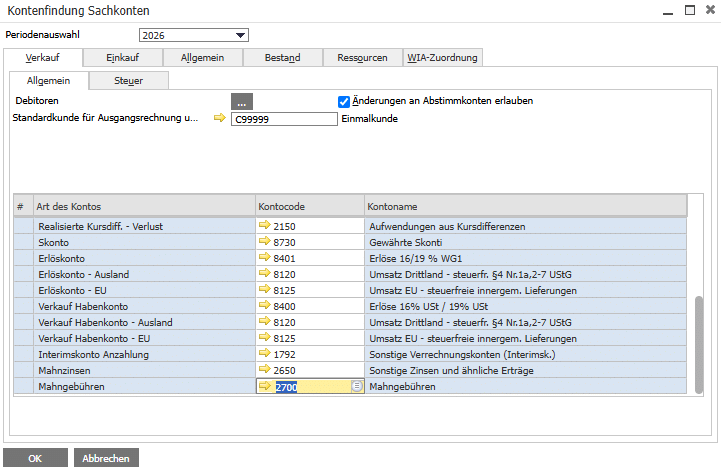
SAP Business One can calculate default interest and reminder fees. Each reminder condition specifies, among other things, the interest rate, calculation days, model, and start date. For B2B payment claims, the statutory default interest rate is generally... nine percentage points above the base interest rate; Contractual and individual case issues should be professionally reviewed.
The prerequisites for automatic bookings are... correctly assigned general ledger accounts and tax codes. If these are missing, the dunning process may partially fail.
Practical tip: Include a reminder letter with all outstanding invoices attached.
A comparison of the three dunning methods
Which method is suitable depends on the customer segment. For large customers, an invoice-based presentation can be useful; in mass-market business, a more streamlined approach is preferable. one collective letter per business partner the effort.
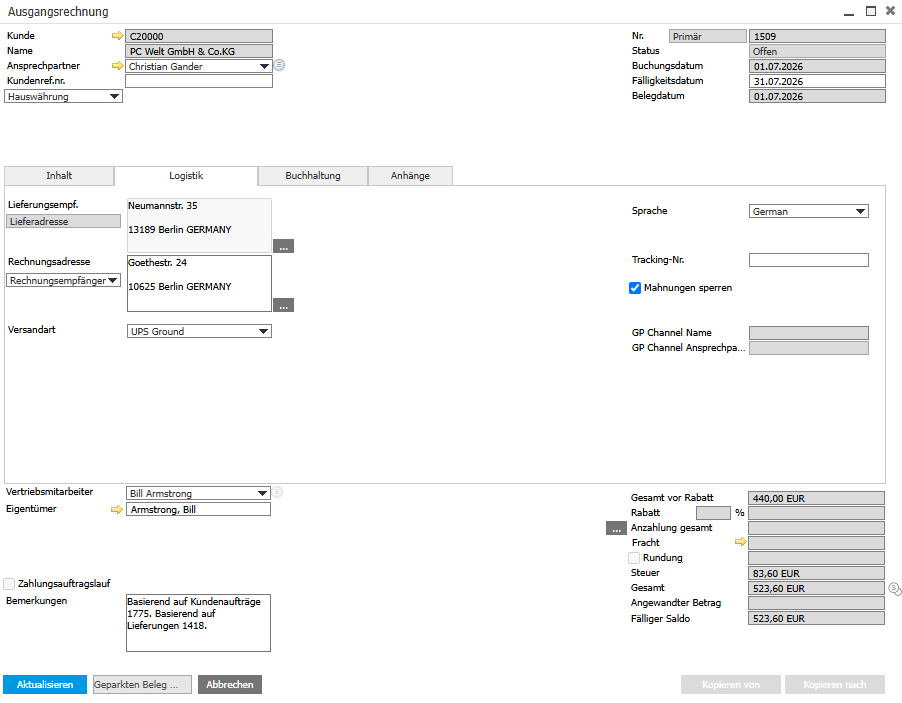
Block payment reminders and manage exceptions
Not every overdue invoice should be immediately subject to a reminder – for example, in the case of complaints, installment payment agreements, or a credit note that is being processed. SAP Business One offers a solution for this. Blocking at document and customer level.
Blocking at document level
- A single outstanding item is excluded from the dunning process.
- The invoice remains open for accounting purposes.
- The suspension can be lifted later.
Customer-level blocking
- The entire customer account will be blocked from receiving payment reminders.
- No payment reminders will be sent during the suspension.
- Suitable for comprehensive agreements or complaints
Additionally, individual customers or items can be removed directly from the recommendation list for the current run without being permanently blocked.
Payment default and legal background
The conditions for default are governed by Section 286 of the German Civil Code (BGB). For performances with a specific calendar date, default can occur without further notice. The 30-day rule applies only under the statutory conditions; additional notification obligations apply to consumers. Section 288 of the German Civil Code (BGB) generally provides for the following regarding B2B payment claims: nine percentage points above the base interest rate before.
SAP Business One maps the operational processing of open, overdue receivables. Dunning history and documents facilitate documentation, but do not replace manual processes. no individual legal review, especially before debt collection or legal dunning proceedings.
Send reminders via email
Our special article explains the specific setup of recipient addresses, email texts, PDF attachments and sending methods: SAP Business One: Sending payment reminders via email.
Link to credit management
The dunning process is integrated with financial accounting, sales, and credit management. Credit and liability limits can be defined for customers and checked against sales documents. Payment history and dunning history provide a basis for future payment terms and release decisions.
For doubtful receivables, additional valuation adjustment processes may be necessary. This allows risks to be addressed not only during the dunning process but also in the financial evaluation.
Best practices for effective debt collection
Fixed reminder schedules
Work weekly or bi-weekly and define clear responsibilities.
Always check first
After making changes to conditions, accounts, or layouts, always perform a test run first.
Customer segmentation
Use appropriate dunning terms for regular, new and high-risk customers.
Check general ledger accounts
Check account assignment and tax codes before making automatic bookings.
Use the aging report
Regularly evaluate the age structure of outstanding items and set priorities.
Coordinate sales
Before the race, compare complaints, promises and ongoing agreements.
Layouts per level
Depict a comprehensible escalation, from friendly to firm.
Maintain standard conditions
Automatically equip new customers with a dunning condition.
Tip for customer relations
A friendly first payment reminder, free of charge, helps maintain the relationship. Additionally, neatly configured Discounts for early payments to expedite payment receipt.
Structured receivables management with SAP Business One
SAP Business One combines dunning levels, customer-specific terms, the guided assistant, interest and fee logic, and dunning history in a single system. The decisive advantage lies in the Integration with financial accounting, credit management and sales.
This creates a scalable accounts receivable process for growing companies: open items are processed according to rules, special cases are specifically excluded, and decisions are made on a common data basis.
Have your debt collection process professionally set up.
As an SAP partner, conesprit supports small and medium-sized enterprises in the setup, customization and maintenance of SAP Business One.
Request a consultation now
In practice, it is recommended One joint dunning letter per customer – regardless of the dunning level of the outstanding items. Related invoices and credit notes can be automatically attached. This gives the customer a complete and clear overview of all outstanding receivables.