
 Get in touch
Create payment advice in SAP Business One
The most important points in brief
- A payment advice notice announces a payment or confirms that it has been made.
- SAP Business One does not include a dedicated function for automatic advice notification generation as standard.
- The payment assistant carries out payment runs; the payment advice is then generated manually or via an add-on.
- An add-on can automatically generate payment advices, send them via email, and archive them.
- A payment advice notice is not mandatory, but it is useful for group payments, large amounts, and international transfers.
- Recipients don't need to do anything initially: The notification serves to inform and facilitates the allocation of outstanding items.
The Payment advice in SAP Business One Payment notification plays a practically important, yet often underestimated, role in payment transactions. It informs the recipient that a payment has been made or is imminent, and facilitates the allocation of payments to outstanding invoices.
This guide explains, what content a payment advice notice requires, how shipping and receiving work and what options SAP Business One offers in its standard form as well as with an add-on.
What is a payment advice notice?
A Payment advice A payment advice note – also known as a payment notification, payment announcement, or payment advice note – is a document that informs the payee about a completed or upcoming payment. It contains the essential payment details and assists the payee with accounting.
A payment advice is no booking confirmation and has no direct legal effect. It is a helpful, but non-binding, informational communication.
Distinction from the payment itself
The payment advice accompanies a transfer or payment run, but does not replace it. The actual posting takes place in SAP Business One via the Payment assistants or as a manual outgoing payment.
Content and structure of a payment advice notice
To ensure the recipient can clearly allocate the payment, a meaningful payment advice The following information is included:
Clear intended use
The clearer the reference, the easier it is for the recipient to allocate the payment to their outstanding invoices. Collective payments with multiple invoices The payment advice is particularly valuable.
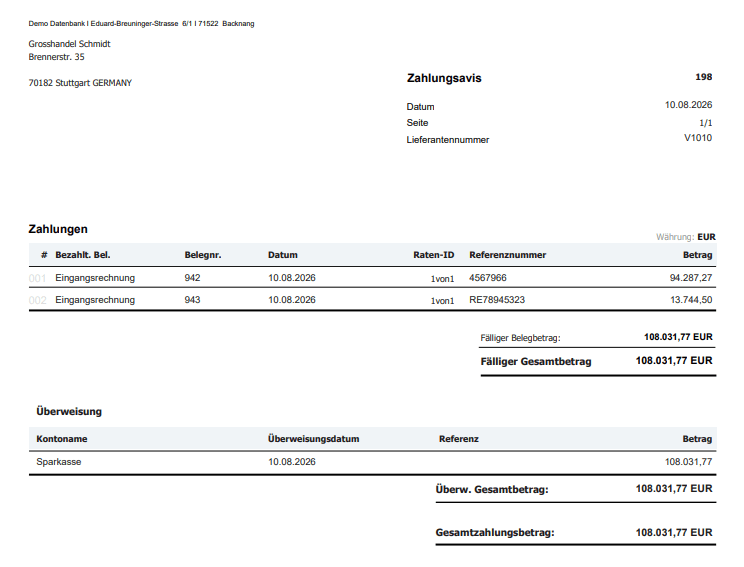

Fig.: Structure of a payment advice notice
Types of payment advices
Three main forms of payment advice are encountered in business transactions. They differ according to..., who issues the document and when it is sent.
In practice with SAP Business One, the Payment confirmation after the payment run The most common form. After execution via the payment assistant, the affected suppliers receive the notification.
Sending and receiving payment advice – what needs to be done?
Send payment advice
Shipping is not a legal obligation for paying companies, but it is a commercially sensible favor. It is particularly recommended:
- in the case of collective payments that bundle several invoices,
- for large sums of money where the supplier needs clarity quickly,
- for international transfers with longer processing times,
- if a discount has been deducted and the difference needs to be traceable,
- in case of unusual payment terms or differing conditions.
Received payment advice
Suppliers who receive a payment advice notice are initially under no obligation to take any action. The following process supports the clean reconciliation of outstanding items:
No compensation
A payment advice never replaces the actual receipt of payment. As long as the amount has not been credited to the account, The demand remains open..
How to set up a payment advice process in SAP Business One?
Whether it's a payment assistant, add-on advice or automatic notification sending via email – we help with implementation.
Request a free initial consultationPayment advice in SAP Business One – native standard
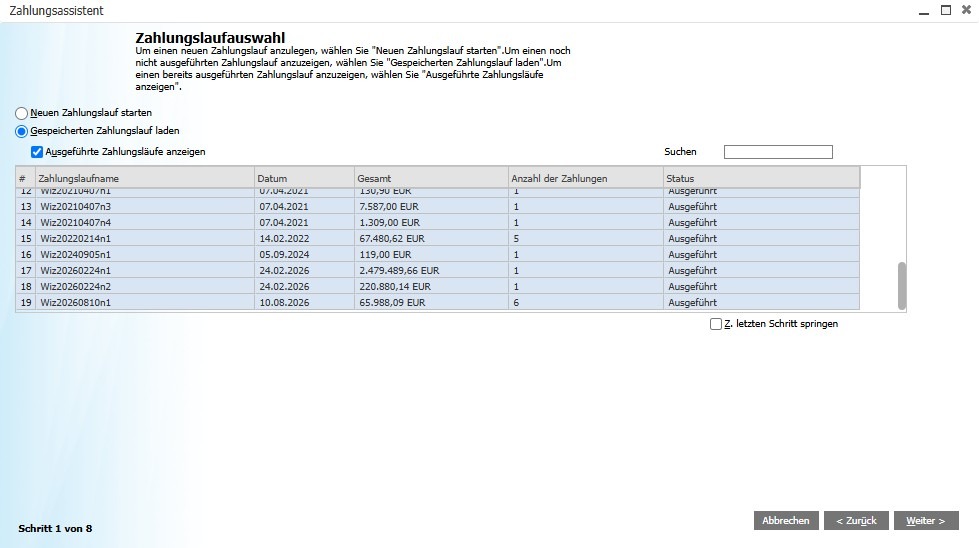
The standard version of SAP Business One is No dedicated function for automatically generating payment advices. The payment process is handled via the payment assistant under Banking → Payment Assistant. It processes transfers for outstanding liabilities in batches.
What the payment assistant does
Outstanding liabilities can be filtered by supplier, due date, amount, and payment method and compiled into a list. Payment run In summary, after execution, SAP Business One creates the corresponding journal entries and balances the open items.
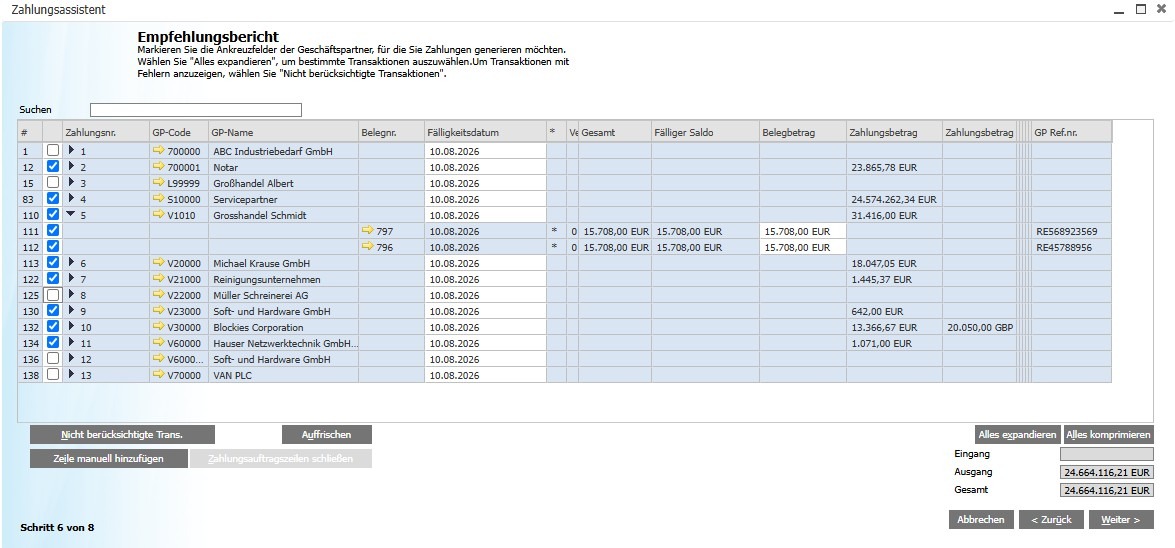
Fig.: Payment advice creation
Payment advice in the standard format: Workaround options
Without an add-on, there are two common ways to... SAP payment advice to create:
Crystal Reports as an interim solution
Those who only occasionally need payment advices can work with a customized Crystal Reports layout. For the regular automated shipping A dedicated add-on is recommended.
Automatically create and send payment advices via add-on
For companies that regularly send payment advices to suppliers, an add-on offers a fully integrated process. Immediately after the payment run, an advice note is generated for each supplier and sent via email.
Typical process with add-on
Advantages and practical tips
A consistently implemented payment advice process improves the Voting on both sides of payment transactions.
Maintain email address in supplier database
For automatic delivery, a valid email address must be stored in the supplier master data. This can be checked at Business partner → Supplier → Communication.
Frequently Asked Questions
Does SAP Business One have a native payment advice function?
No. The payment assistant executes payment runs, but does not generate any payments. no separate notification document. This requires a customized Crystal Reports layout or an add-on.
How can a discount be shown in the payment advice?
An add-on can specify the discount percentage, the amount deducted, and the resulting amount. Automatically display net payment amount. The Crystal Reports workaround requires the fields to be included in the layout.
Can a payment advice be generated for payments in foreign currency?
Yes. SAP Business One supports foreign currency payments via the Payment Assistant. A suitable add-on can... Foreign currency, exchange rate and equivalent in local currency to be displayed in the notification.
How to automate payment advice in SAP Business One?
Whether it's add-on selection, automatic notification sending or optimization of the payment process – we accompany the implementation from start to finish.
Request a free initial consultation